
USB CAN FD Analyzers: SeRoSys Desk CAN Pro and Lab CAN Pro
USB CAN FD tools for engineers who need two buses, not one
CAN tools developed by engineers for engineers with a focus on what really matters!
SeRoSys Desk CAN Pro and Lab CAN Pro give you dual CAN 2.0 / CAN FD channels, software-configurable termination, and a lifetime SLSS CANAnalyser license—at a price that competes with single-channel Peak adapters.
 |
 |
One time purchase price, no recurring license fee!


THE IMPORTANCE OF EFFICIENT AND ACCURATE DATA ANALYSIS
At SeRoSys Technology, we understand the importance of efficient and accurate data analysis in today’s fast-paced industries. That is why we have developed a range of innovative products that allow engineers to quickly and easily analyze CAN data, helping to identify issues and improve overall performance.
OUR STRENGTH MAKES YOU SUCCESSFUL
Ready to use, via high-speed USB 2.0 with automatic driver detection.
Easy-to-use software for live analysis and recording of two CAN buses simultaneously.
Allows you to filter CAN IDs to simplify the evaluation and only capture the required messages.
Active live view of translated CAN signals (*.dbc).
Standalone transmission mode to realize software-independent and time-critical transmission tasks.
Our German and English-speaking experts are on hand to provide you with advice and assistance.

WHY WE DEVELOP OUR SOFTWARE OURSELVES
As engineers with an automotive background, we know what is important and which functions make our work easier.
If a function is needed to cover a standard, we develop it ourselves. Our experience in software development and daily work with bus systems helps us to do this.
To offer this convenience to other engineers and technicians, every SeRoSys dongle purchased includes a license for our CAN analysis software.
OUR GOAL IS TO PROVIDE THE RIGHT HARDWARE AND SOFTWARE COMBINATION FOR EVERY APPLICATION
Our hardware and software solutions are designed with the needs of our customers in mind. We know that engineers need powerful tools that are easy to use and customizable to their specific needs. That’s why we’ve made it our mission to develop products that are intuitive, flexible, and scalable. Whether you’re in the automotive or industrial sector, SeRoSys Technology has the tools you need to succeed. Our products are designed to be compatible with a wide range of CAN-bus systems, so you can be confident that you’ll be able to get the data you need, no matter what.
-
Desk CAN Pro
-
Lab CAN Pro
-
SLSS CANAnalyser
-
SLSS CANData Viewer
-
SLSS Graphic CANAnalyser
Desk CAN Pro: compact dual-channel CAN FD analyzer
Desk CAN Pro is a dual-channel USB CAN 2.0 and CAN FD analyzer for engineers, technicians and developers. Both channels run up to 1,000 kbit/s in CAN 2.0 and up to 10 Mbit/s in the CAN FD data phase, with 1 microsecond timestamps and a one-million-message ring buffer.
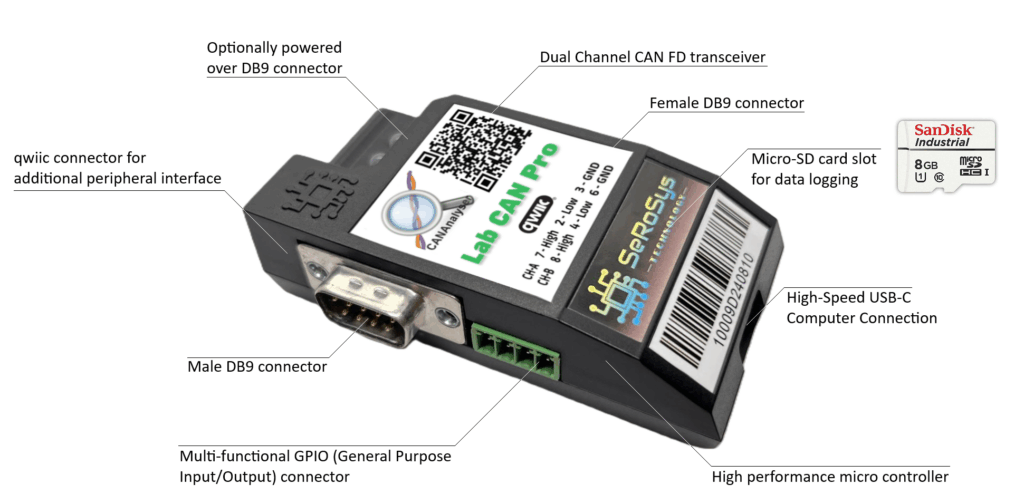
Male and female pass-through DB9 connectors let you tap an existing bus without breaking it, and termination is switched in software. A lifetime SLSS CANAnalyser licence is included, with no subscription.

Lab CAN Pro: standalone CAN FD logger for the bench
Lab CAN Pro has everything the Desk CAN Pro does, and adds the hardware you need when a PC is not attached. A micro-SD slot logs bus traffic on its own, and recorded logs can be played back onto either channel.
Two GPIO inputs and two outputs bridge the bus to the physical world, a Qwiic connector adds sensors and displays, and the unit can be powered from the D-SUB connector at +7 V to +28 VDC as well as over USB.
It also logs Analog Devices A2B alongside CAN on one timeline, which is unusual in this class of tool.
SLSS CANAnalyser: dual-channel CAN and CAN FD analysis
SLSS CANAnalyser is the software included with every SeRoSys dongle, licensed for life with no subscription. It monitors both channels at once, sends specified CAN 2.0 and CAN FD messages, logs everything on the bus, and imports DBC files so raw bytes are displayed as physical values. Send lists can be uploaded to the hardware for standalone transmission with no PC attached.

SLSS CANData Viewer: analysis of recorded CAN logs
The CANData Viewer opens recorded logs for offline analysis. Apply a DBC file to turn raw CAN data into named signals, filter down to the messages, IDs or signals that matter, search and navigate large captures, and export the result. It is the tool for working through a log after the test rather than during it.

SLSS Graphic CANAnalyser: plotting CAN data over time
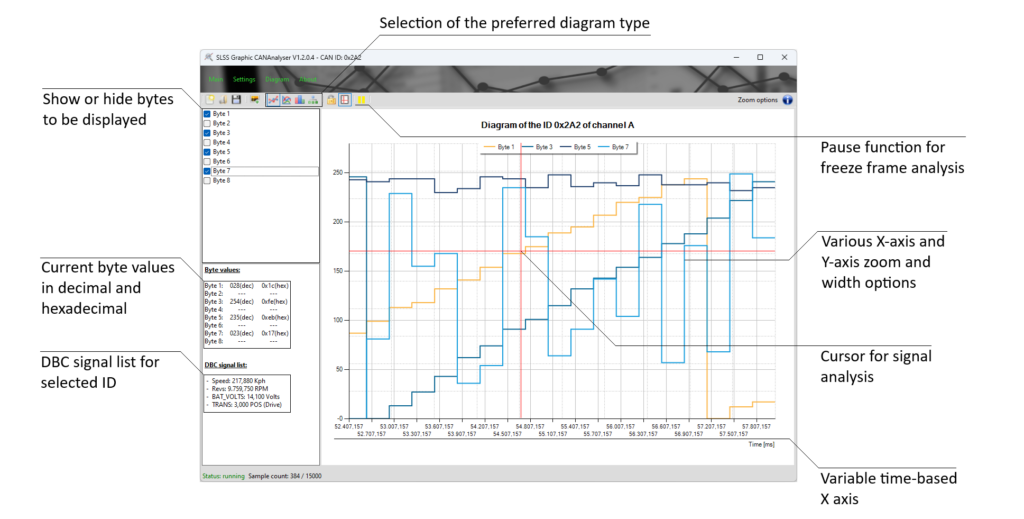
The Graphic CANAnalyser plots data bytes from selected CAN messages onto a graph against the hardware timestamp, so signal behaviour over time is visible at a glance. Four graph styles are available, which makes it straightforward to spot trends, anomalies and the moment something changed.
CUSTOMIZABLE AND INTEGRATED: EXTEND FUNCTIONALITY WITH THE TCP/IP SOFTWARE INTERFACE
At SeRoSys-Technology, we prioritize seamless integration into our customers’ toolchains. With the TCP/IP interface* of the SLSS CANAnalyser software, users can effortlessly remote-control the application and forward data to other programs. This powerful feature ensures maximum flexibility for custom workflows and streamlines connectivity with external systems. Experience enhanced interoperability, enabling you to embed our software as a key component in your development environment.
CAN bus guides for engineers
Practical, plain-language guides on CAN FD analysis, logging, DBC decoding, J2534 and standalone sending and logging, with honest comparisons to PEAK, Ixxat and Vector tools.
READY TO TAKE THE NEXT STEP?

Discover how SeRoSys can elevate your operations with the most advanced CAN bus tools. Our team is here to answer any questions and provide all the details you need.
Feel free to contact ourSeRoSys Technology Marketing and Sales Team
sales@serosys-tech.com